
UtilitiesFeatured
MacPrune
Map your disk and clean it by risk when your Mac is almost full.
- Free, Pro is a one-time purchase
- macOS 13 or later
- Apple Silicon and Intel
- None needed
- MacPrune
About
What MacPrune is
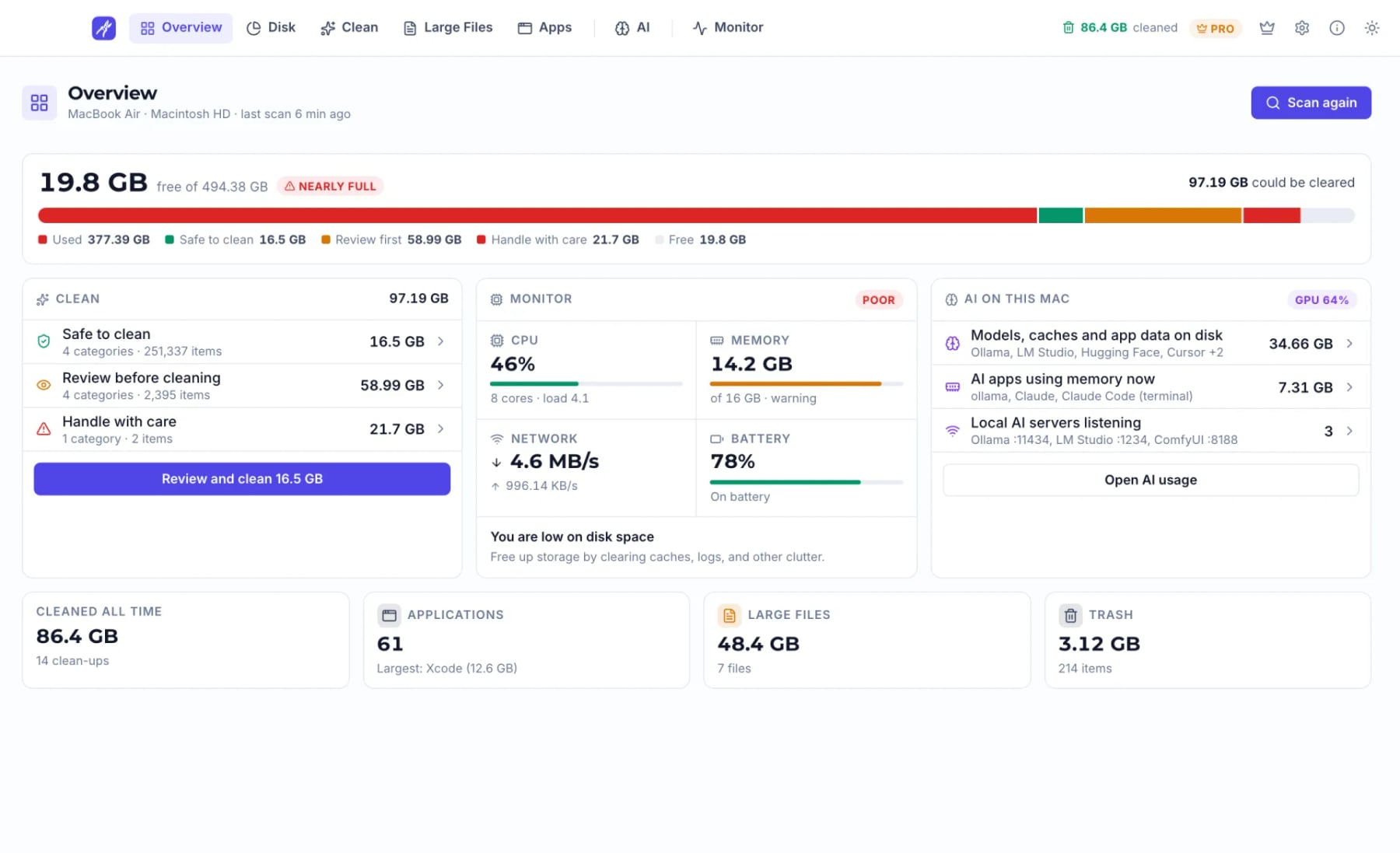
MacPrune is a storage cleaner and system monitor for the Mac. When the disk is almost full, it shows you why: every folder drawn as a tile sized by the space it takes, so you can see where each gigabyte went before you delete anything.
Clean by risk, not by guesswork
One scan sorts the clutter into three groups: safe to clean, review before cleaning, and handle with care. Every category carries its label, nothing moves until you confirm, and what you clean goes to the Trash rather than being deleted outright, so anything can be put back until you empty it. MacPrune frees disk space; it does not promise to make your Mac faster.
More than caches
The Large Files view lists the biggest files above a size you choose. The App Uninstaller removes an app together with the files it leaves around the system, and the Leftover Finder clears what earlier uninstalls left behind. The AI usage page shows what tools like Ollama, LM Studio and Cursor keep on disk (models, caches and app data), what is running and which local ports are open.
A monitor on the same screen
The Monitor page puts CPU, GPU, memory, disk, network and battery on one page, with a network speed test, and lets you quit the heaviest apps. A compact menu bar panel shows storage, memory, battery, CPU and network at a glance. You can lay the app out with tabs or a sidebar, in dark, light or the system theme.
Private by default
Scanning and cleaning happen on your Mac. File names, paths, sizes and scan results are never sent anywhere, and there is no analytics, telemetry or ad tracking in the app. It goes online only to check for updates, to validate a Pro licence, and to run the speed test when you click it.
Pricing
The free Basic version scans everything and includes the disk map, AI usage, the monitor and cleaning of user caches, browser caches and the Trash, with no card, no account and no trial timer. Basic handles large files up to 1 GB at a time and uninstalls two apps per batch. Pro is a one-time payment with free updates: it adds every cleanup category (system logs, old and duplicate downloads, mail attachments, iOS backups, Xcode, Docker and package caches), unlimited large files and uninstalls, and removal of downloaded AI models and app data. Pro for one Mac is $19.99, with licences for 3, 5 and 10 Macs.
MacPrune needs macOS 13 Ventura or later and runs on Apple Silicon and Intel. Download it from macprune.com, open it, allow Full Disk Access when asked, and run your first scan.
What it does
Key features
- Disk mapEvery folder as a tile sized by its space, so you see where each gigabyte went.
- Clean by riskOne scan sorts clutter into safe, review first, and handle with care.
- Everything to the TrashNothing is deleted outright and nothing moves until you confirm.
- Large filesThe biggest files above a size you choose, biggest first.
- App uninstallerRemoves an app with its related files; the leftover finder clears old ones.
- AI usageWhat Ollama, LM Studio and Cursor keep on disk, what runs and which ports are open.
- Live monitorCPU, GPU, memory, disk, network and battery on one page, with a speed test.
- Menu bar healthStorage, memory, battery, CPU and network in a compact panel.
- Stays on your MacNo analytics or telemetry; scan results are never sent anywhere.
For developers
Built a Mac app? Put it on the list.
Free with our badge on your site. A free account, one form, and a person reviews it.