Productivity
ShortcutDock
A menu bar app launcher. One click, and your apps drop down.
- Free, Pro is a one-time purchase
- macOS 13 or later
- Apple Silicon and Intel
- Works offline
- ShortcutDock
About
What ShortcutDock is
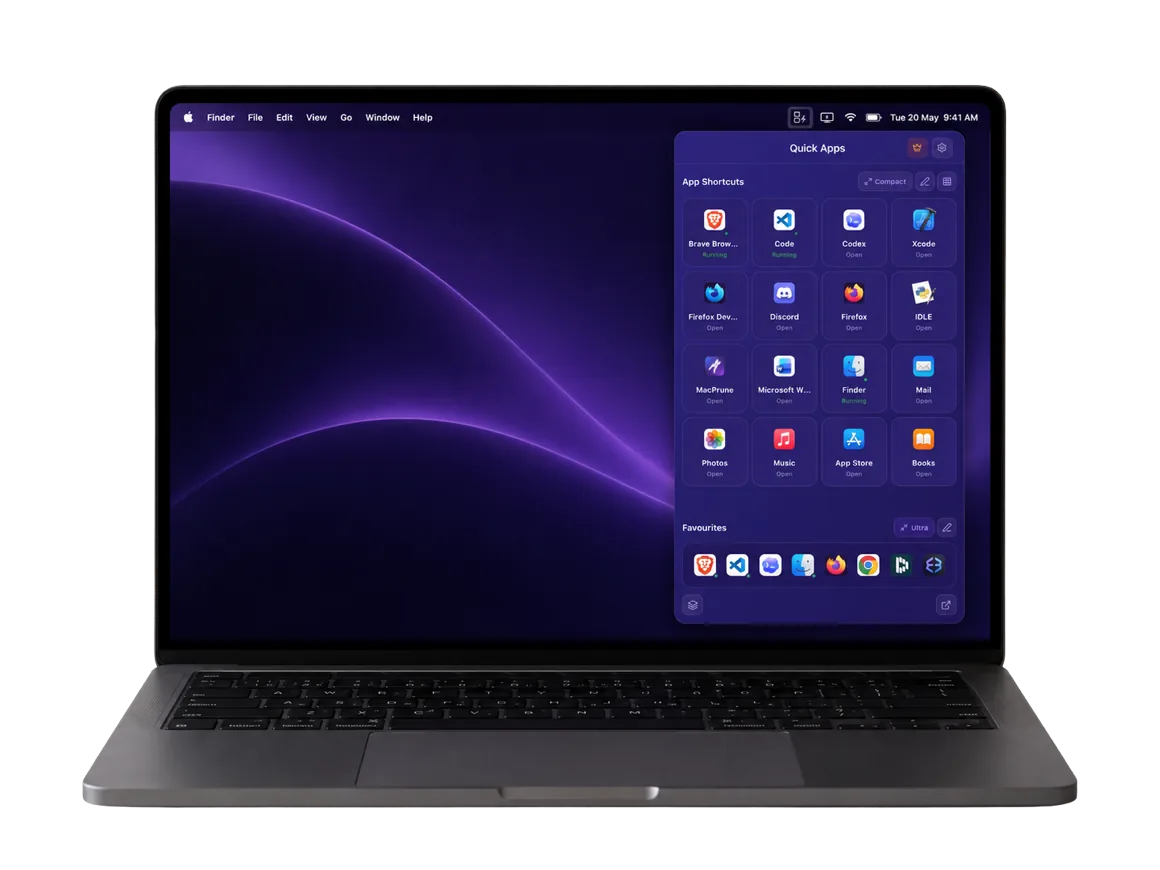
ShortcutDock is an app launcher that lives in the Mac menu bar. Click its icon, or press your shortcut, and a grid of your apps drops down; click one and it opens. It can sit beside the Dock or replace it entirely.
Set up in seconds
On first run ShortcutDock finds every installed app in your Applications folder, so there is nothing to add by hand. Type a few letters to find any app as you type, pin the ones you use most to the favourites bar at the bottom of the grid, and drag apps and groups into the order you want. A green dot marks the apps that are already running.
Groups that launch together
Smart groups collect apps for one kind of work, such as browsers, developer tools or design, and launch the whole group with one click. A global keyboard shortcut, which you choose in Settings, opens the grid from anywhere.
Light on your Mac
ShortcutDock runs on Apple Silicon and Intel in one universal build and uses under 20 MB of memory while idle. It can start at login, comes in Indigo, Dark and Light looks, and leaves no background processes behind when you drag it to the Trash.
Private and offline
The app runs entirely offline: no account, no network, nothing synced to a cloud. It does not track which apps you launch and collects no analytics.
Pricing
The free version is a working launcher, not a trial: 8 app shortcuts, 5 favourites, 1 group, the global shortcut and automatic app discovery, with no ads. Pro is a one-time payment of $19.99 for one Mac, with no subscription. It removes the limits on shortcuts, favourites and groups, adds custom styling and icons, and includes priority email support and free updates.
ShortcutDock needs macOS 13 Ventura or later. It is a direct download from shortcutdock.com; the first time you open it, right-click the app and choose Open.
What it does
Key features
- Menu bar dropdownYour apps in a grid that drops down from the menu bar.
- Hide the DockUse ShortcutDock as your only launcher, or keep both.
- Auto-discoveryFinds every installed app on first run; nothing to set up.
- App searchType a name and find any app as you type.
- Smart groupsBrowsers, dev tools or design apps, launched together in one click.
- Favourites barYour most-used apps pinned along the bottom of the grid.
- Global shortcutOpen the grid from anywhere, with the keys you choose.
- Under 20 MB of memoryOne universal build for Apple Silicon and Intel.
- Runs offlineNo account, no network, no tracking of what you launch.
For developers
Built a Mac app? Put it on the list.
Free with our badge on your site. A free account, one form, and a person reviews it.